Moving involves more than transferring boxes and furniture. You must also manage every physical and digital method used to enter your current home and access the new one.
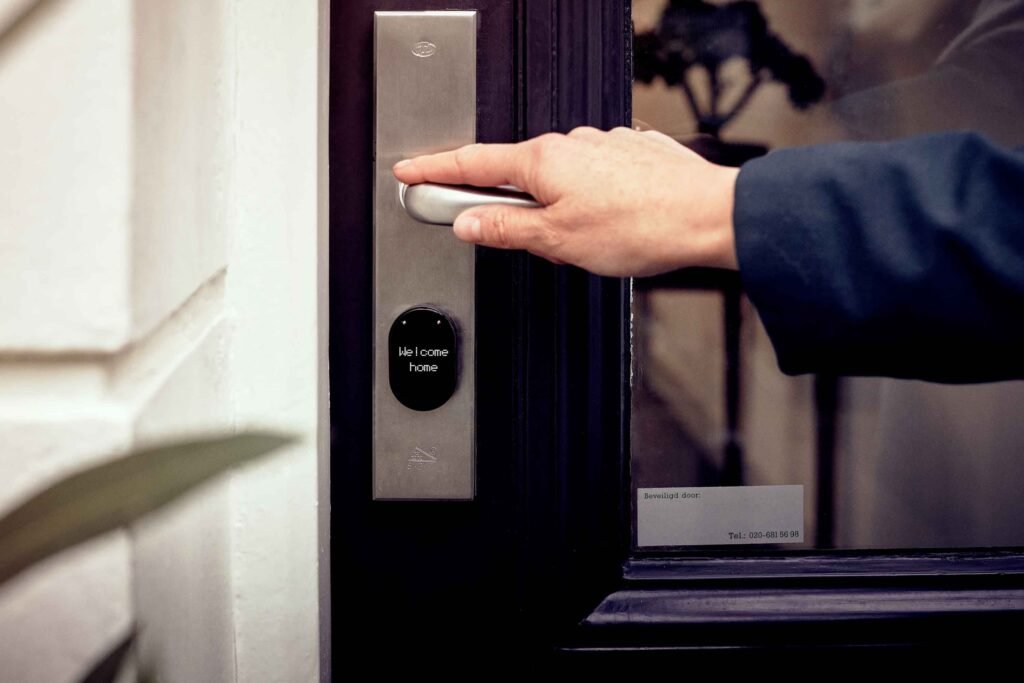
House keys are only the beginning. Modern properties may use building fobs, garage remotes, mailbox keys, gate openers, alarm codes, smart locks, mobile apps and connected security devices. Forgetting one of these items can delay possession, create replacement fees or leave a former resident with access that should have been removed.
Create a complete access inventory before moving day. Renters should confirm what must be returned, while homeowners should document what will remain with the property and securely transfer control to the new owner.
Why Access Items Need Their Own Moving Checklist
Keys, remotes and codes are small enough to overlook but important enough to disrupt a move.
Poor access planning may lead to:
- Being unable to enter the new property
- Movers waiting outside the building
- Missed elevator or loading reservations
- Charges for lost keys or fobs
- Mailbox access problems
- Garage doors that cannot be operated
- Former residents retaining digital access
- Security-system alarms
- Smart devices remaining connected to someone else’s account
- Buyers not receiving access to included property features
- Tenants returning incomplete key sets
Unlike furniture, access credentials should not be packed into an ordinary moving box. Keep them organized, labelled and under your direct control.
Create a Complete Access Inventory
Walk through the property and list every entrance, locked space and connected access system.
Your inventory may include:
Physical Keys
- Front-door keys
- Back- and side-door keys
- Patio-door keys
- Deadbolt keys
- Mailbox keys
- Garage keys
- Shed keys
- Storage-locker keys
- Utility-room keys
- Window keys
- Gate keys
- Elevator keys
- Safe keys
- Keys held by family members
- Spare keys given to neighbours or friends
Electronic Access Items
- Apartment-building fobs
- Parking-garage fobs
- Elevator fobs
- Amenity-access cards
- Garage-door remotes
- Gate openers
- Parking passes
- Security cards
- Intercom credentials
- Electronic mailbox cards
- Remote controls for included property systems
Codes and Digital Access
- Door keypad codes
- Smart-lock codes
- Garage keypad codes
- Alarm codes
- Gate codes
- Intercom codes
- Lockbox combinations
- Mobile-app permissions
- Smart-home administrator accounts
- Security-camera access
- Video-doorbell accounts
- Connected thermostat accounts
- Smart garage-controller accounts
Do not record passwords or sensitive access codes in an unsecured document. The inventory can identify that a credential exists without displaying the credential itself.
Use a Key and Access Inventory Table
A written inventory helps you track who has each item and what must happen before possession changes.
| Access item | Quantity | Current holder | Required action | Completed |
|---|---|---|---|---|
| Front-door keys | ___ | ___ | Return or transfer | ☐ |
| Mailbox keys | ___ | ___ | Return or transfer | ☐ |
| Building fobs | ___ | ___ | Return to management | ☐ |
| Garage remotes | ___ | ___ | Transfer or reset | ☐ |
| Parking passes | ___ | ___ | Return or transfer | ☐ |
| Alarm code | N/A | ___ | Delete or replace | ☐ |
| Smart-lock account | N/A | ___ | Transfer or remove | ☐ |
| Gate opener | ___ | ___ | Return or transfer | ☐ |
| Storage key | ___ | ___ | Return or transfer | ☐ |
Photograph physical items together before returning or transferring them. This creates a record of what was provided without exposing private codes.
What Renters Should Do Before Moving Out
Renters should review their lease and contact the landlord or property manager. The required return process may differ by property.
Ask:
- Which keys and fobs are recorded under my name?
- How many of each item must be returned?
- Do parking passes need to be returned?
- Must mailbox keys be returned separately?
- Should garage remotes be returned?
- Where and when should the items be delivered?
- Will I receive a written receipt?
- What are the charges for missing items?
- Should temporary access codes be deleted?
- When will my building access be deactivated?
Do not leave keys inside the apartment unless the landlord has specifically instructed you to do so. A key left on a counter may not provide proof that it was returned.
Return access items using the approved method and request written confirmation.
Collect Keys From Everyone Who Had Access
Several people may possess copies of your keys without appearing on your main keyring.
Contact:
- Household members
- Former roommates
- Relatives
- Trusted neighbours
- House sitters
- Pet sitters
- Cleaners
- Childcare providers
- Contractors
- Real estate representatives
- Anyone given a temporary key
Do this early enough to replace a missing item or notify the appropriate person before the move.
For a rental property, disclose any unauthorized copies rather than quietly ignoring them. The landlord may need accurate information to secure the property for the next resident.
Separate Keys for the Old and New Homes
Mixing the two sets is an easy moving-day mistake. Use clearly different containers or tags for each property.
Keep the following groups separate:
- Current-home items to return
- Current-home items to transfer
- New-home keys and access items
- Vehicle keys
- Storage keys
- Keys that remain with you
- Spare keys requiring identification
Avoid writing the complete street address on a key tag. If the keys are lost, the label could tell the finder exactly which property they open.
Use a private identifier that makes sense to you but does not reveal the location.
Keep Essential Access Items With You
Keys, fobs and remotes should travel in your personal essentials bag, not in the moving truck.
Keep with you:
- New-home keys
- Current-home keys needed until departure
- Building fobs
- Elevator credentials
- Loading-area passes
- Parking-garage remotes
- Storage keys
- Vehicle keys
- Alarm instructions
- Property-manager contact information
- Access-related documents
Our guide to packing a moving-day essentials box explains which other documents and supplies should remain accessible.
Before the moving crew arrives, test the new-home keys and confirm that all required building access has been activated.
Provide Movers With Temporary Access Carefully
Movers may need to enter a gate, loading dock, service entrance or elevator. Use temporary or supervised access whenever possible.
Safer options include:
- Meeting the crew at the entrance
- Asking security staff to admit the crew
- Using a temporary code that expires
- Reserving a service elevator
- Providing a temporary visitor pass
- Having one household member remain near the access point
Avoid giving movers your main household password or a permanent alarm code when a limited-access alternative is available.
When temporary access is necessary:
- Restrict it to the moving date and hours.
- Provide access only to required areas.
- Avoid reusing a personal password.
- Delete or deactivate the credential after the move.
- Check the access history when the system provides one.
Share necessary information with the moving company’s designated contact rather than posting codes in a shared or public location.
Coordinate Building Access Before Moving Day
Apartment and condominium buildings may restrict moving activity to specific doors, elevators and hours.
Confirm:
- The approved entrance
- Loading-dock access
- Elevator reservations
- Fob activation
- Security-desk procedures
- Parking-garage clearance
- Gate operation
- Move-in and move-out hours
- Required identification
- Temporary passes
- After-hours procedures
- Emergency contact information
Make sure your reservation includes enough time for both loading and elevator use.
Add these tasks to your final-week moving plan so access problems are addressed before the truck arrives.
What Home Sellers Should Transfer
A home seller should identify the physical and digital access items included with the property. The transfer should follow the purchase agreement and instructions from the relevant real estate or legal professionals.
Items that may need to remain with the home include:
- Exterior-door keys
- Garage remotes
- Gate openers
- Mailbox keys
- Shed and outbuilding keys
- Built-in safe keys when included
- Alarm instructions
- Smart-lock documentation
- Manuals for connected devices
- Codes for included keypads
- Information needed to transfer eligible device accounts
Do not transfer a personal password that you use elsewhere. Create a temporary credential or follow the device’s ownership-transfer procedure.
Remove access belonging to former guests, workers and household members before completing the handover.
Transfer Smart-Home Ownership Securely
A smart device attached to a home is not automatically transferred simply because the physical device remains behind. It may still be connected to the seller’s email address, mobile app or cloud account.
Connected devices may include:
- Smart locks
- Video doorbells
- Security cameras
- Alarm systems
- Garage-door controllers
- Thermostats
- Smart lighting hubs
- Gate systems
- Leak detectors
- Irrigation controllers
- Voice assistants
Before moving out, determine whether each device:
- Will remain with the property
- Will be taken with you
- Supports ownership transfer
- Requires a factory reset
- Stores personal information
- Contains recordings or activity history
- Uses a paid subscription
- Depends on equipment that will be removed
Follow the manufacturer’s official transfer or reset instructions for the specific device. A procedure appropriate for one system may not work for another.
Do Not Share Your Personal Account Password
Transferring an included device does not mean giving the new resident your personal email password or reusing your account credentials.
Use one of these methods when supported:
- Invite the new owner through the device’s transfer feature.
- Remove the device from your account.
- Create a temporary administrator account.
- Cancel the personal subscription.
- Perform a factory reset.
- Let the new resident create a separate account.
Remove stored payment information, personal contacts, location history, recordings and household routines where applicable.
The Federal Trade Commission recommends changing default credentials, using unique passwords, enabling two-factor authentication and keeping internet-connected devices updated. Its guide to securing connected home devices provides additional security guidance.
What to Reset at Your New Home
Receiving keys does not tell you how many copies may still exist. Homeowners should decide whether to rekey or replace exterior locks after taking possession.
Also consider resetting:
- Smart-lock administrator access
- Door keypad codes
- Garage remotes
- Garage keypad codes
- Alarm codes
- Gate codes
- Intercom credentials
- Security-camera accounts
- Connected doorbells
- Smart-home hubs
- Wi-Fi credentials
- Guest access
- Temporary contractor codes
Check every exterior entrance, including less obvious doors leading from an attached garage, basement, patio or side yard.
Renters should ask the landlord or manager which codes will be changed and when former residents’ fobs will be deactivated. Do not alter building-owned systems without authorization.
Secure the New Home’s Connected Devices
When a smart device remains in the property, make sure a previous user cannot continue viewing or controlling it.
After gaining authorized ownership:
- Remove previous users.
- Change default usernames and passwords.
- Create a unique password.
- Enable two-factor authentication when available.
- Install current updates.
- Review connected accounts.
- Delete unnecessary guest codes.
- Check privacy and recording settings.
- Confirm the recovery email and phone number.
- Review subscription billing.
- Test physical backup access.
- Secure the new Wi-Fi network.
Connected locks and cameras should not remain on credentials supplied by a former occupant.
Handle Garage Access Separately
Garage access is frequently overlooked because people focus on the front door.
Check for:
- Handheld remotes
- Vehicle-programmed remotes
- Exterior keypad codes
- Mobile-app users
- Smart garage controllers
- Emergency-release keys
- Interior doors connecting the garage and home
A former resident’s vehicle may still contain a programmed garage control even after all handheld remotes have been returned.
Owners should follow the garage system’s instructions for clearing stored remotes and adding only authorized devices. Renters should ask the property manager to handle building-owned equipment.
Do Not Forget Mailboxes and Storage Areas
A front-door key does not necessarily provide access to every area included with the home.
Confirm access to:
- Community mailboxes
- Apartment mailrooms
- Parcel lockers
- Basement storage
- Outdoor sheds
- Bicycle rooms
- Parking garages
- Amenity rooms
- Utility areas
- Rooftop or courtyard spaces
Test each key or fob before moving day where possible. A mislabeled storage key may not be discovered until the moving crew is waiting with boxes.
Document the Handover
A proper handover record can prevent later disagreements about missing items.
The record should include:
- Property address
- Date and time
- Description of each item
- Number of keys
- Number of fobs
- Number of remotes
- Parking passes
- Storage keys
- Whether codes were transferred separately
- Name of the person receiving the items
- Confirmation or signature
Do not write alarm codes, passwords or sensitive access information directly on a general receipt. Transfer confidential credentials through an appropriate separate method.
Renters should keep their return receipt with the lease, inspection report and deposit records.
When Should Access Be Transferred?
Timing depends on the property arrangement.
Renters
Return access items according to the lease and landlord’s instructions, usually after personal belongings have been removed and the final inspection has been completed.
Home Sellers
Follow the possession terms and instructions provided for the transaction. Transferring access too early could create security and liability concerns.
Home Buyers
Confirm exactly when possession begins and when access will be available. Do not schedule movers before you are legally entitled and practically able to enter the property.
Apartment Residents
Coordinate key collection with the office or security desk. Confirm its operating hours so a late arrival does not result in a lockout.
What to Do When a Key or Fob Is Missing
Do not wait until the final handover to disclose a missing access item.
Take these steps:
- Check household keyrings, bags, drawers and vehicles.
- Contact anyone who previously received access.
- Notify the landlord, building manager or appropriate transaction contact.
- Ask whether the missing item can be deactivated.
- Confirm the replacement process.
- Ask about applicable charges.
- Document the report and resolution.
An electronic fob may be deactivated, but a missing physical key may require a different security response.
Do not create a replacement or duplicate building credential without authorization.
What to Do When a Fob Stops Working on Moving Day
A fob may fail because its access period has expired, the account was deactivated early or the system is experiencing a technical problem.
When this happens:
- Do not force the door.
- Try another authorized entrance.
- Contact building management or security.
- Confirm your reservation and access period.
- Have identification and move documents available.
- Notify the moving crew about the delay.
- Record the problem if it affects paid moving time.
Avoid allowing unknown people to follow the crew through a controlled entrance. Busy moving activity can create opportunities for unauthorized entry.
Our guide to what happens on moving day can help you coordinate access with the rest of the day’s schedule.
Access Handover Timeline
| Time before moving | Access task |
|---|---|
| Three to four weeks | Review lease, building rules or possession arrangements |
| Two weeks | Create an inventory of keys, fobs, remotes and codes |
| One week | Collect access items from household members and other holders |
| Several days | Confirm building access, elevators and loading areas |
| Day before | Test essential keys and separate old- and new-home items |
| Moving day | Keep required access items with you |
| Final departure | Return or transfer physical access as instructed |
| After possession changes | Remove old users and reset authorized digital access |
Keys, Fobs and Access Codes Checklist
At the Old Home
- Count all keys.
- Collect copies from other people.
- Identify building fobs and parking passes.
- Gather garage and gate remotes.
- Delete temporary access codes.
- Remove personal smart-home accounts.
- Preserve necessary manuals.
- Document items being returned or transferred.
- Obtain a receipt where appropriate.
During the Move
- Carry access items personally.
- Keep old- and new-home sets separate.
- Use temporary mover access when possible.
- Protect codes from unnecessary disclosure.
- Keep building contact information available.
- Confirm loading and elevator access.
At the New Home
- Test all keys and fobs.
- Confirm mailbox and storage access.
- Identify every exterior entrance.
- Reset authorized door and alarm codes.
- Clear old garage remotes.
- Remove previous smart-device users.
- Change default passwords.
- Enable two-factor authentication where available.
- Create secure backup access.
- Store spare keys responsibly.
Frequently Asked Questions
Should keys go in the moving truck?
No. Keep keys, fobs, remotes and other essential access items with you. A delayed truck or misplaced box could otherwise prevent you from entering the new property.
Do renters have to return every copy of a key?
The requirements depend on the lease and property rules. Renters should return all required keys and disclose additional or missing copies to the landlord.
Should homeowners change the locks after moving?
Because previous keys may exist, new owners should assess whether exterior locks need to be rekeyed or replaced. Smart-lock users should also remove old users and change administrator credentials.
What should I do with a smart lock when selling my home?
Determine whether the lock is included in the sale, remove personal data and follow the manufacturer’s ownership-transfer or reset instructions. Do not give the buyer a password used for your other accounts.
Can I give movers my door code?
Temporary, limited access may be appropriate when necessary. Avoid sharing a permanent household code. Delete the temporary credential after the move.
Who pays for a missing apartment fob?
The lease or building policy may make the tenant responsible for a replacement charge. Report the missing fob promptly so it can be deactivated.
Should garage remotes remain with the property?
When the garage system is included with a sold home, applicable remotes are commonly part of the access handover. Follow the purchase agreement and relevant professional instructions. Renters should follow the landlord’s requirements.
How should access codes be transferred?
Avoid sending permanent codes through an insecure public channel. Use an approved method, transfer only necessary credentials and replace temporary information after the recipient establishes control.
What if the previous owner still controls a smart device?
Follow the manufacturer’s official ownership-recovery instructions and contact the appropriate transaction representative if cooperation is required. Do not attempt to access someone else’s account.
When should I return my old keys?
Return them according to the lease, possession agreement or property manager’s instructions. Make sure you have finished removing belongings before surrendering your final authorized access.
Keys, fobs and access codes deserve the same attention as moving documents and valuables. Inventory every access method, keep essential items with you, document the handover and remove former users from connected systems. These steps can prevent delays while giving both the old and new properties a cleaner, safer transition.
Moving Note: Lease terms, property-transfer procedures, replacement charges and building-access rules vary. Follow your written agreements and confirm requirements with the landlord, property manager or appropriate transaction professional before transferring access.